Best Mobile Phones for Older People UK: 2026 Buying Guide
What Is the Best Mobile Phone for Old Age UK in 2026?
Text to speech
00:00
5sec
Duration: 00:00
Font size
Published: 25 Feb, 2026
Share this on:
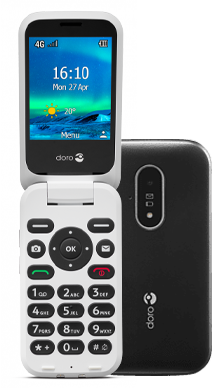
The best mobile phone for old age UK users in 2026 depends on how simple you want the device to be. For straightforward calling and texting, the Doro 6820 stands out as the best big button mobile phone for elderly users thanks to its loud sound, clear screen, and charging cradle.
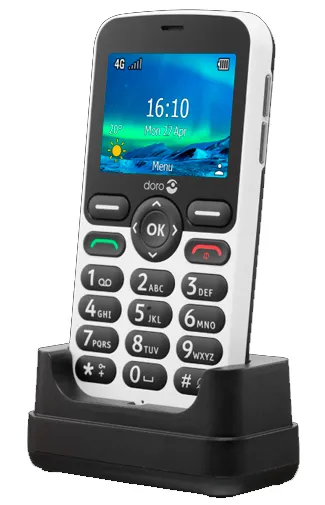
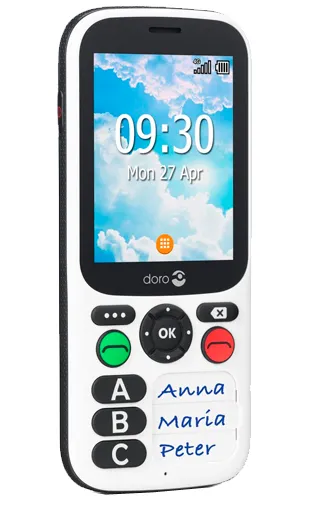
If mobility is limited, the Doro 5860 offers a sturdy bar-style design with large, tactile keys. For added safety, the Doro 780X includes an SOS button and GPS support.
If your parent or relative needs apps like WhatsApp, NHS services, or online banking, a simple smartphone such as the Motorola Moto G55 provides a more modern but still easy-to-use experience.
Each option supports 4G connectivity, which is essential in the UK as older networks continue to shut down. The right phone for elderly people should prioritise safety, clarity, and ease of use over flashy features.
Best Mobile Phones for the Elderly at a Glance
Below is a snapshot of the top mobile phone for old age UK users, chosen for ease of use, safety, and value. Caregivers and loved ones can use this table to quickly compare key features.
Model
Type
Best For
4G
WhatsApp/Apps
SOS Button
Charging Cradle
Approx Price
Doro 6820
Big button flip
Best overall phone for elderly
✔️
✖️
✔️
✔️
~£70
Doro 5860
Big button bar
Best for limited hand mobility
✔️
✖️
✔️
✔️
~£65
Doro 780X
Safety-oriented phone
Best for emergency / caregiver support
✔️
✖️
✔️ (GPS)
Optional
~£100
Nokia 2660 Flip
Budget flip
Cheapest flip phone for elderly
✔️
Limited
✔️
✖️
~£50
Motorola Moto G55
Simple smartphone
Best for WhatsApp & apps
✔️
✔️
✖️
✖️
~£130
Note: Prices shown are approximate UK retail values in 2026 and can vary by retailer or promotional offer.
What Caregivers Should Consider Before Choosing a Mobile Phone for Elderly People
Choosing the right mobile phone for elderly users, beyond features on paper, is about how the phone performs in real life, especially when used by someone with limited tech experience, impaired vision, or health concerns. As a caregiver, you want a device that works intuitively, doesn’t frustrate the user, and helps you stay connected and safe.
Below are the main factors that matter most:
1. Safety Comes First: SOS, GPS & Emergency Support
Caregivers consistently rank quick access to help as the most important feature. Phones that include:
SOS or Assistance buttons (one-press emergency contact)
GPS tracking (to locate the user when needed)
Easy contact lists (speed dial for loved ones)
…can make real differences in urgent situations.
Doro 780X excels in this area
Most Doro phones include an assistance button
Smartphones require setup for emergency contacts, but offer more apps
If the person you care for has mobility difficulties or lives independently, prioritise safety features over extras.
2. Large Buttons & Clear Display: Essential for Ease of Use
Older eyes and hands benefit massively from:
Big button mobile phone layouts
High-contrast screens
Tactile keys with audible feedback
Phones designed for seniors reduce mistakes when dialing numbers or texting, and they cut down frustration.
Feature phones (like Doro 6820 and Doro 5860) typically offer the best ergonomics.
Standard smartphones can feel overwhelming unless interfaces are simplified.
3. Hearing & Vision Support
Many older users also have:
Hearing aids
Partial sight loss
Difficulty reading small text
Look for:
Hearing Aid Compatibility (HAC)
Adjustable text size
Loud, clear audio
Simple menu layouts
These help make phone use easier, not just possible.
4. Simplicity vs Smart Capability
Not every older user needs a smartphone, but many benefit from apps such as:
WhatsApp (for easy messaging and video calls)
NHS app (for appointments and prescriptions)
Email & banking apps
Big button mobile phones keep things simple but don’t support apps.
Simple smartphones like the Motorola Moto G55 support apps while staying easy to use.
Ask yourself:
Does the person need internet and messaging apps?
Or is calling and texting enough?
Your answer should guide the choice.
5. Charging Ease & Reliability
Charging is a surprisingly common frustration for seniors. Good features include:
Charging cradles (docks where you just place the phone)
Large, easy cables
Clear charging indicators
Phones that are harder to charge are less likely to be used consistently, especially by users with limited dexterity.
Many doro phones include a charging cradle.
Standard smartphones do not.
6. Caregiver Setup & Support
A caregiver’s job doesn’t end with a purchase; it includes setup.
Make sure the phone lets you:
Add emergency contacts
Label contacts clearly
Set up speed dial
Enable accessibility features
Install essential apps (if a smartphone)
Sometimes the setup matters more than the device itself.
Takeaway
The best mobile phone for old age UK users combines:
Simplicity
Safety
caregiver-friendly features
clear audio and screen
reliable charging
In the next section, we’ll look at the best big button mobile phones designed specifically for older users, starting with the most reliable options you can buy today.
Best 5 Big Button Mobile Phones for Elderly Users (Easy, Clear & Reliable)
If your priority is simplicity, voice clarity, tactile buttons, and quick access to contacts, a big button mobile phone for elderly people will often be the best choice. These devices keep the basics front and centre: calling, texting, loud audio, and easy charging. Below are the caregiver-approved options that stand out for older users in the UK.
Doro 6820: Best Overall Big Button Mobile Phone
Doro 6820
Why we recommend it
The Doro 6820 combines simplicity with smart safety. It uses large numeric keys and a clear, easy-read screen. The assistance (SOS) button lets the user alert multiple contacts at the press of a single key, ideal for caregivers who need peace of mind.
Top features:
Dedicated SOS/assistance button
Charging cradle for easy daily power-ups
Loud, clear speaker and hearing aid compatibility
Simple messaging and calling menus
Best for: Those who want a big button mobile phone the elderly can master quickly.
Doro 5860: Best for Limited Hand Mobility
Doro 5860
Why it’s great
If an older person has trouble opening flip phones or using smaller designs, the Doro 5860 delivers a straightforward bar-style phone with large push buttons and a rugged build.
Stand-out features:
Horizontal layout (no flipping needed)
Large buttons with strong tactile feedback
Assistance button for emergencies
Charging cradle included
Best for: Users with limited hand movement or vision challenges.
Doro 780X: Best Safety-Focused Big Button Phone
Doro 780X
What sets it apart
The Doro 780X takes safety further with built-in GPS and enhanced SOS features. That’s especially useful if the user spends time alone or may wander.
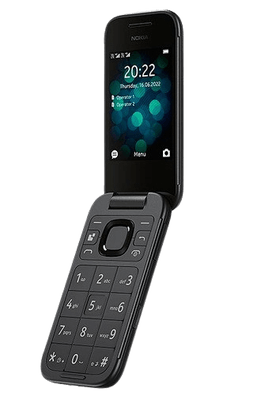
If you want big button ease of use on a tight budget, the Nokia 2660 Flip delivers basic calling, texting, and a simple external screen.
Highlights:
4G connectivity
Assistance button (limited setup)
Classic flip design
Cheapest big button mobile phone option
Best for: Older users who want simplicity and low cost.
Notes on Older Cell Phones vs. Big Button Phones
Traditional “older cell phone” designs (standard non-smartphone units) focus on the basics, which many caregivers prefer. Unlike smartphones, they don’t force menus, icons or app complexity. For users who only need phone calls and texts, a big button mobile phone for elderly often fits best.
Summary of Big Button Phones
Phone
Best For
4G
SOS
Cradle
Doro 6820
Best overall
✔️
✔️
✔️
Doro 5860
Mobility ease
✔️
✔️
✔️
Doro 780X
Safety & GPS
✔️
✔️ (GPS)
Optional
Nokia 2660 Flip
Budget simplicity
✔️
✔️
✖️
All of the above are designed to deliver clarity over complexity
They support big button use, which helps users with limited dexterity
They stay connected with 4G support, essential in the UK as older networks retire
Best 2 Mobile Phone for Elderly with WhatsApp & Apps
Not every older user wants a basic feature phone. Many now use WhatsApp, book NHS appointments online, and check bank accounts digitally. In those cases, a simple smartphone works better than a traditional big button mobile phone.
If the person you’re supporting needs messaging apps or internet access, choose a mobile phone for elderly with WhatsApp rather than a basic feature phone.
Motorola Moto G55 – Best Simple Smartphone for Older Users
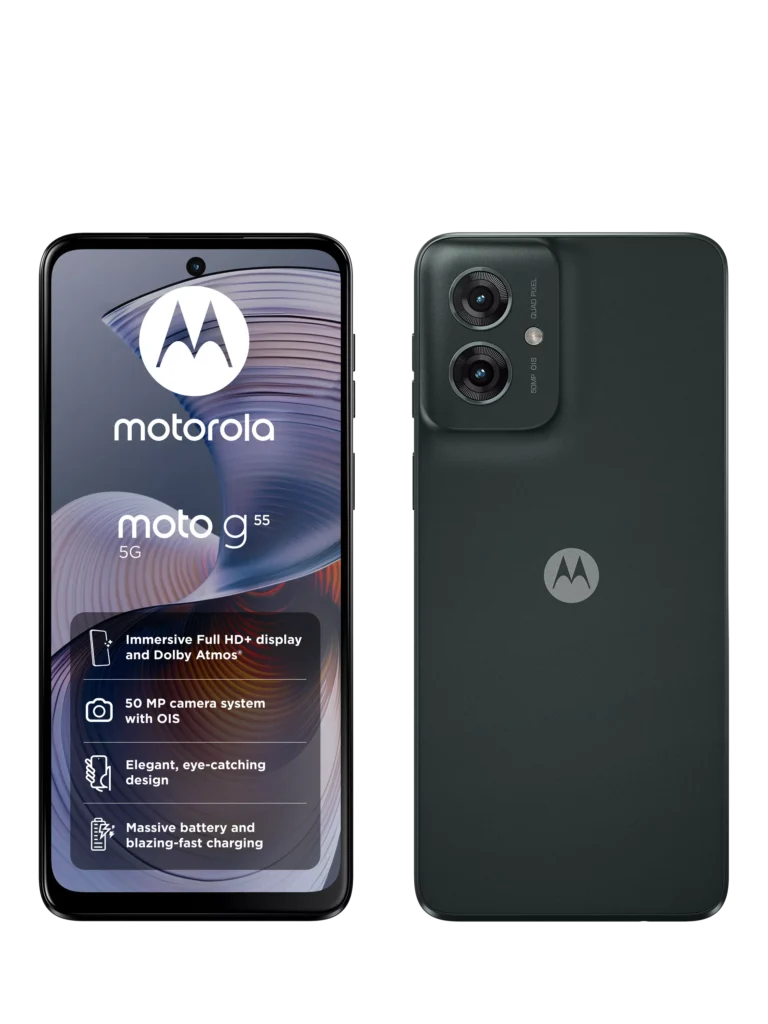
The Motorola Moto G55 strikes the right balance between affordability and simplicity. It runs Android, supports WhatsApp and NHS apps, and delivers strong battery life, without overwhelming the user.
Why caregivers like it:
Large 6.49in bright display
Strong battery (often lasts all day)
Clean, simple Android interface
4G/5G ready for UK networks
Affordable price (~£130)
With accessibility settings enabled (larger text, bold fonts, simplified home screen), it becomes one of the easy to use mobile phones for the elderly that still supports modern apps.
Chatsie Phone – Best Senior-Focused Smartphone
The Chatsie Phone simplifies the smartphone experience even further. It replaces complex icons with clear text buttons and includes strong accessibility tools.
Key benefits:
Large, adjustable text
Simple text-based menus
Voice dictation for texting
UK-based support line
Pre-installed protective case
It costs more (~£299), but it reduces confusion for users who struggle with traditional smartphone layouts.
When Should You Choose a Smartphone Instead of a Big Button Mobile Phone?
Choose a smartphone if the person:
Uses WhatsApp to stay in touch
Needs NHS or banking apps
Wants video calls with family
Reads news online
Is comfortable with touchscreens
Stick with a big button mobile phone for elderly users if they only call and text and prefer physical keys.
Accessibility Tip for Caregivers
You can make most Android phones more elderly-friendly by:
Increasing text size
Enabling bold fonts
Removing unnecessary apps from the home screen
Setting up emergency contacts
Adding WhatsApp shortcuts for family members
A smartphone can become a highly practical phone for elderly people, but only after proper setup.
Cheapest Mobile Phone for Old Age UK (And Are Free Options Real?)
Many families search for the cheapest mobile phone for old age UK users because they only need basic calling and texting. The good news: you don’t need to spend much to get something reliable.
Cheapest Mobile Phone for Old Age UK (Under £50–£70)
If you want a simple phone for aged users, focus on:
Big physical buttons
Loud speaker
Clear screen
4G compatibility
Best low-cost options:
Nokia 2660 Flip (~£50–£60)
TTfone Mercury 2 (budget big button model)
Older entry-level Doro phones (often discounted)
These phones handle calls and texts without distractions. For many older users, that’s all they need.
If your priority is simplicity and affordability, a large button mobile phone under £70 will usually cover the basics.
Is There a Free Mobile Phone for Old Age UK?
Many people ask about a free mobile phone for old age UK schemes. In reality, the UK government does not provide free phones simply based on age alone.
However, some situations may offer low-cost or subsidised options:
Certain charities support vulnerable or isolated older adults
Some mobile providers offer discounted plans for low-income households
Family contracts or SIM-only deals can reduce total cost
Be cautious of online ads promising “completely free phones” with hidden contracts.
If cost is the main concern, you will usually save more money by:
Buying a low-cost handset outright
Choosing a cheap SIM-only plan (£5–£10 per month)
Avoiding long contracts for basic use
Cost vs. Value
Spending slightly more on a reliable big button mobile phone for elderly 4G use often saves frustration later. Very cheap models without 4G support may stop working properly as UK networks retire older systems.
For most families, the sweet spot sits between £50 and £130, depending on whether you choose a feature phone or smartphone.
Why 4G Matters for a Mobile Phone for Old Age UK in 2026
If you’re buying a mobile phone for old age UK users in 2026, 4G support is essential.
UK mobile networks have shut down (or are actively shutting down) older 3G services. That means some very old feature phones will stop working properly for calls or texts. If you buy outdated stock, you risk giving an older person a phone that struggles with coverage or emergency calls.
Always Choose a Big Button Mobile Phone for Elderly 4G Use
When comparing devices, check that the phone:
Supports 4G calling (VoLTE)
Works on UK networks (EE, O2, Vodafone, Three)
Is unlocked or compatible with your chosen provider
Most modern Doro mobile phones now support 4G. That includes:
Doro 6820
Doro 5860
Doro 780X
Budget models like the Nokia 2660 Flip also support 4G, which makes them safer long-term purchases.
Importance for Caregivers
A phone that doesn’t connect properly creates real risk.
If an older person presses the SOS button and the phone fails to place a call due to poor network compatibility, that becomes more than an inconvenience.
Choosing a 4G-ready phone for elderly people protects against:
Dropped calls
Poor signal
Inability to dial emergency services
Limited future network support
Avoid “Old Stock” Bargains
You might see very cheap “older cell phone” models online. Before buying, confirm:
It supports 4G
It is not locked to a discontinued network
It is not dependent on 3G-only calling
In short, a mobile elderly phone must be future-ready, not just affordable.
How to Choose the Right Phone for the Aged (Simple Decision Guide)
mobile phone for old age uk
Choosing the right phone for aged users becomes much easier when you focus on real needs instead of brand names. Use the guide below to decide quickly and confidently.
Step 1: Do They Only Call and Text?
If the person only wants to:
Make calls
Send basic texts
Avoid apps and internet
→ Choose a big button mobile phone for elderly users.
Best fit:
Doro 6820
Doro 5860
Nokia 2660 Flip
These phones for elderly mobile use focus on clarity and simplicity.
Step 2: Do They Use WhatsApp or NHS Apps?
If they need:
WhatsApp messaging
Video calls
NHS or banking apps
Email access
→ Choose a mobile phone for elderly with WhatsApp (a simple smartphone).
Best fit:
Motorola Moto G55
Chatsie Phone
A smartphone works better for digital independence.
Step 3: Do They Have Mobility or Dexterity Issues?
If opening flip phones or pressing small buttons causes difficulty:
→ Choose a bar-style large button mobile phone like the Doro 5860.
The fewer moving parts, the better.
Step 4: Is Safety a Priority?
If the person:
Lives alone
Has fall risk
Experiences memory concerns
Needs emergency support
→ Choose a model with a strong SOS system and 4G connectivity.
Best fit:
Doro 780X
Doro 6820
Safety features often matter more than screen size.
Step 5: Is Budget the Main Concern?
If cost drives the decision:
Under £70 → choose a budget big button phone
£100–£150 → choose a simple smartphone
Most families do not need to spend more than £150 for a reliable mobile phone for elderly people.
Quick Summary
Choose:
Big button feature phone → for maximum simplicity
Simple smartphone → for WhatsApp and online services
4G model only → for future-proof reliability
SOS-enabled phone → for caregiver peace of mind
The best phone for the elderly balances safety, clarity, and confidence.
Final Verdict…
Here’s a practical summary so you can choose the best mobile phone for old age UK users with confidence, whether simplicity, safety, affordability, or connectivity matters most.
Best Overall (Simple & Reliable): Doro 6820
Perfect for: PHONE CALLS + TEXTS without confusion
Features: Big tactile keys, loud audio, SOS assistance button, charging cradle
It’s easy to master, gets loud and clear sound, and supports 4G, a must in 2026. Best pick if the user just needs a dependable mobile phone for elderly use.
Best for Limited Mobility: Doro 5860
Perfect for: Users who struggle with flipping phones
Features: Bar-style design, large buttons, assistance button, charging cradle
Why you’ll like it: Simplicity without flipping, great for reduced dexterity.
Best big button mobile phone for elderly users with limited hand use.
Best Safety-Focused: Doro 780X
Perfect for: Independent seniors with caregiver concerns
Features: SOS button with GPS, loud audio, 4G
It adds built-in GPS for better safety and location support. Best choice for caregivers who need peace of mind.
Cheapest Big Button Option: Nokia 2660 Flip
Perfect for: Tight budgets
Features: 4G, basic call/text, simple flip design
Why it’s useful: Lowest cost while still covering essential features.
The most affordable big button mobile phone for elderly users.
Best Smartphone with WhatsApp: Motorola Moto G55
Perfect for: Seniors who use WhatsApp, banking, NHS apps
Features: Large screen, simple Android, long battery life
Why it’s great: Delivers both simplicity and modern app support.
Best choice when apps and digital services matter.
Helping You Choose the Right Mobile Phone for an Older Loved One?
If you searched for “best mobile phone for old age UK,” “big button mobile phone for elderly 4G,” “cheapest mobile phone for old age UK,” or “mobile phone for elderly with WhatsApp,” you’re likely trying to make a safe, practical decision for someone you care about.
Choosing the right phone for elderly people isn’t just about price. It affects:
Safety and emergency response
Access to NHS apps and digital services
Communication with family
Confidence and independence
The wrong device can create frustration, missed calls, or even risk in urgent situations.
Care Sync Experts supports UK families and regulated care providers with:
Clear, practical guidance on choosing safe and easy-to-use mobile phones for the elderly
Advice on setting up SOS features, accessibility tools and caregiver contacts
Digital inclusion support for older adults transitioning to smartphones
Governance guidance for domiciliary and supported living services improving communication systems
How can you make a smartphone easier for an older person to use?
Modern smartphones (Android or iPhone) have built-in accessibility features designed to help older users with visual, hearing, or motor challenges. You can:
– Increase font size and icon size so text is easier to read. – Enable voice control or voice assistant so the user can speak commands instead of tapping small buttons. – Turn on spoken notifications or screen-reading tools to read alerts and messages aloud.
Most devices also let you remove unnecessary apps and organise key contacts on the home screen for quick access.
What features help people with hearing loss when choosing a phone?
For older adults with hearing loss, look for:
– Hearing Aid Compatibility (HAC) — phones rated with M3/T3 or higher reduce interference and work better with hearing aids. – Adjustable volume and loud speaker options for clearer conversations. – Extra-loud ringtones with vibration options so calls aren’t missed.
Phones designed for seniors often include these, and many modern smartphones also support Bluetooth pairing with hearing aids or neck loops.
Do smartphones designed for seniors exist beyond standard big button phones?
Yes, there are simplified smartphones specifically made for older users that go beyond basic features:
– Some models combine big touch-friendly menus, high-contrast displays, and SOS/emergency functions tailored for users with visual or motor impairments. – Certain devices pair voice-first interfaces with simple menu systems so users can operate by speaking rather than navigating complex icons.
These options provide a middle ground between basic feature phones and traditional smartphones for users who want both simplicity and modern capability.
Are all big button phones the same, or are there different styles?
There are several styles of big button phones for older users:
– Feature phones with large physical keys — simple calling and texting. – Flip-style big button phones — buttons are large and easy to see once opened. – Phones with photo or speed dial buttons for one-touch calling to key contacts. – Models with amplified sound and SOS buttons to help in emergencies.
The specific design that suits someone best often depends on their mobility, vision, hearing and how they plan to use the phone.